Understanding and Using Funnel Infographic PowerPoint Templates
A funnel infographic is a powerful visual metaphor, ideal for depicting processes that filter, refine, or narrow down from a broad beginning to a specific endpoint. Common examples include marketing conversion pipelines, customer journey stages, or academic retention statistics. Creating these graphics from scratch demands considerable design skill and time. This is where specialized resources like Funnel Infographic PowerPoint Templates come into play, offering a structured and efficient solution.
The Purpose and Practical Value of Pre-Designed Funnel Templates
Funnel Infographic PowerPoint Templates are pre-built slide layouts specifically crafted to illustrate funnel-shaped processes. Their core purpose is to eliminate the foundational design work, allowing users to focus solely on inputting their data and narrative. Instead of spending hours aligning shapes, choosing color hierarchies, and ensuring typographic consistency, you begin with a coherent visual framework. The practical value is significant: it accelerates production, ensures a professional baseline aesthetic, and reduces the cognitive load of simultaneously designing and content creation. For professionals who need to communicate complex stage-based information clearly and quickly, these templates transform a potentially lengthy task into a manageable one.
Key Characteristics and Functional Strengths
Examining a typical Funnel Infographic PowerPoint Template reveals several consistent characteristics. They are built within Microsoft PowerPoint, a platform ubiquitous in business and education environments. This means the primary editing experience is familiar to most users, leveraging standard tools like shape formatting, text boxes, and SmartArt-like structures.
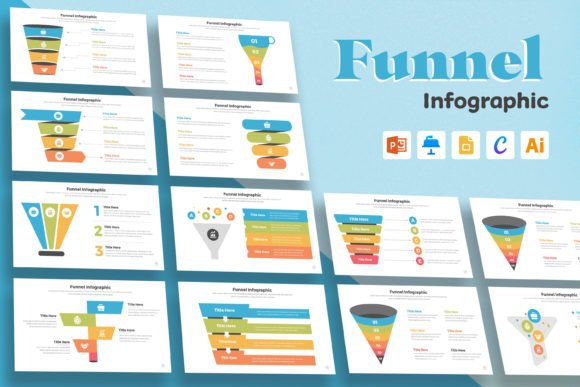
A primary strength is their inherent structural clarity. The funnel shape is the central, non-negotiable graphic element, often with clearly demarcated tiers or sections. Each tier is typically paired with placeholder text for labeling stages (e.g., "Awareness," "Consideration," "Decision") and for inserting quantitative data or descriptive bullet points. Another notable strength is design consistency. The template provides a coordinated color palette, font choices, and iconography across all slides or funnel variations included in the pack. This ensures that the final output looks like a single, intentional piece rather than a collage of mismatched elements.
The promise of being easy to edit in other software like Google Slides or Adobe Illustrator is a key feature. While core functionality resides in PowerPoint, export capabilities to PDF or image formats are straightforward. For more advanced graphic manipulation, users might import the PowerPoint shapes into Illustrator, though this may require some reformatting. The true flexibility lies in the ability to modify everything: you can change colors to align with your brand, adjust the number of funnel stages by adding or removing segments, and swap icons to better suit your industry context.
Performance in Real-World Application
In a practical setting, the performance of a Funnel Infographic PowerPoint Template hinges on its usability and output effectiveness. For a marketing manager needing to present quarterly lead conversion data to the team, the template acts as a scaffold. They can insert the raw numbers into the predefined data slots, perhaps adjust the color of each funnel stage to represent different campaigns, and generate a polished slide in under thirty minutes. The visual output immediately conveys the attrition or conversion rate story more intuitively than a table of numbers could.
For an educator creating course materials on a scientific filtering process, the template provides a clean, distraction-free visual. They can replace business-oriented icons with science symbols, annotate each stage with explanatory text, and embed the final graphic into a lecture deck or handout. The template's reliability is consistent; it won't "break" or malfunction. Its effectiveness is directly tied to the user's content—the template amplifies clear data and narrative but won't compensate for vague or poorly structured information.
Quality Considerations and Long-Term Utility
The quality of available Funnel Infographic PowerPoint Templates varies across providers. A well-designed template exhibits careful attention to visual hierarchy: the funnel should be the dominant element, with supporting text and data balanced in size and placement. Typography should be legible at standard viewing sizes, and color contrasts should be sufficient for clarity, not just aesthetics. High-quality templates often include multiple layout variations—a simple three-stage funnel, a detailed five-stage funnel with data callouts, a horizontal funnel option—which adds to their long-term value. Purchasing a robust pack means you have a reusable resource for different projects over time, adapting the core concept to various presentation needs.
Usability extends beyond simple editing. A thoughtful template will include brief instructions on how to modify elements, which is particularly helpful for less frequent PowerPoint users. The long-term value is economic and practical; instead of commissioning custom graphics for each new funnel-based report, you have a adaptable tool in your arsenal.
Audience Fit and Ideal Use Cases
Funnel Infographic PowerPoint Templates are not for everyone. They are exceptionally well-suited for specific audiences and scenarios.
Business Professionals & Marketers: This group benefits most. Creating funnel visuals for sales pipelines, customer acquisition journeys, or website traffic conversion is a recurrent task. Templates standardize these reports across departments and save precious time during deadline-driven periods.
Educators & Trainers: When explaining processes that involve stages of elimination, refinement, or selection—from historical analysis methods to ethical decision-making models—a funnel graphic can enhance comprehension. Templates allow educators to produce consistent teaching materials without graphic design expertise.
Freelancers & Consultants: As solo operators presenting analyses to clients, a professional-looking funnel graphic enhances credibility. Using a template ensures their deliverables maintain a high visual standard, reflecting the quality of their professional service.
Small Business Owners: For owners managing their own marketing or operational planning, these templates offer a cost-effective way to create strategic visuals for internal planning or investor presentations.
The template is less appropriate for projects requiring wholly unique, brand-defining artistic illustration or for processes that do not conceptually follow a narrowing path. It is a tool for communication efficiency, not for avant-garde design.
Practical Recommendations and Observed Limitations
When selecting and using a Funnel Infographic PowerPoint Template, a few practical recommendations apply. First, preview all slides in the template pack before use. Ensure the included variations match the scope of your project—you might need a funnel with data labels integrated, not just a bare shape. Second, upon first edit, immediately apply your brand's primary color to the master funnel shape to anchor the design to your identity. Third, resist over-complicating the graphic. The funnel's power is in its simplicity; overcrowding it with too many icons or text blocks can dilute its impact.
Observations of limitations are also important. While editable, some templates with complex layered shapes can be fiddly to adjust for an exact number of stages not originally designed. There is also a potential for a "template look"—if many in your industry use the same base design, your graphic might lack distinctiveness. Furthermore, the template only provides the structure; the intellectual labor of defining the correct stages and sourcing accurate data remains entirely with the user. Its value is in execution, not conception.
Ultimately, Funnel Infographic PowerPoint Templates are a pragmatic resource for anyone who regularly needs to visualize stage-based narrowing processes. They fit seamlessly into standard office workflows, reduce the barrier to producing clear visuals, and offer reliable, reusable utility. Their worth is judged not by flashy features, but by the time saved and the clarity gained in your communication. If your work involves explaining how many become few, or how broad inputs lead to specific outputs, such a template is likely a sensible and effective addition to your toolkit.