Elevating Visual Narratives with Flexible Cafe Dating Illustrations
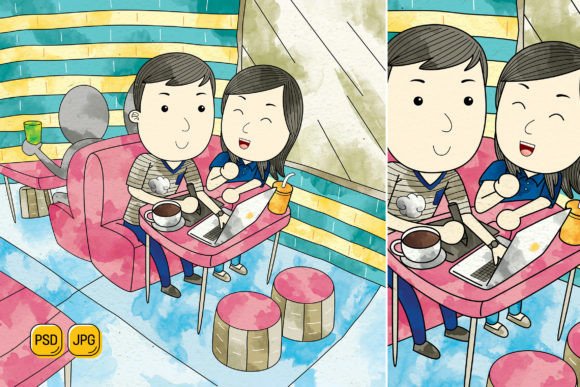
In the toolkit of a modern creator, visual assets are not just decorative elements; they are strategic communication tools. The Couple Dating in Cafe Illustration collection represents a shift from static, single-use imagery to a dynamic, adaptable resource designed for integration into diverse professional workflows. This isn't merely a set of pictures; it’s a modular system of 100 original, high-resolution illustrations built for practical implementation across platforms and projects.
Integrating Modular Illustrations into Your Creative Process
The true value of this illustration set lies in its process-oriented design. Before a project begins, these assets serve as a foundational visual library. A marketing manager planning a social media campaign for a restaurant or dating app can immediately access a coherent theme, eliminating the time-consuming search for disparate stock images. A blogger writing about relationships or urban lifestyles can plan their post visuals alongside their content outline, knowing they have a consistent aesthetic ready to deploy.
During the execution phase, the compatibility with Adobe Photoshop and the provision of PSD files with Smart Objects transforms the workflow. This allows for non-destructive editing. You can change the color of the coffee cup, the couple’s clothing, or the background wallpaper directly within your composite layout without altering the original file. This maintains efficiency and organization, especially when working on a series of materials like a landing page, a printed brochure, and corresponding social media banners. The ability to resize without loss of quality, thanks to the 5000x5000 pixel size and 600 DPI resolution, ensures consistency from a large website hero image to a small Instagram story graphic.
A Resource for Cross-Platform Content Creation
Understanding how these illustrations interact with other tools and platforms is key to smooth integration. The flat design style ensures they pair well with modern UI elements on websites, clean layouts in infographics, and minimalist branding. For an entrepreneur, combining these cafe elements with their own logo, typography, and color palette in a tool like Photoshop creates a customized banner that feels uniquely branded, not generic. Educators can extract individual elements—a table, a steaming cup—to combine with text and diagrams in presentation software, creating engaging slides that break from templated clipart.
The workflow extends beyond digital use. The high-resolution JPG files are directly suitable for printing materials. A freelance designer tasked with creating cafe menus, event posters, or promotional flyers can implement these illustrations directly into their layout software, confident that the print quality will be maintained. This eliminates the common quality control hurdle of sourcing web-optimized images that fail in physical print.
Practical Implementation and Customization Strategies
To leverage this asset for long-term use, consider organizing the files as part of your core digital resource library. Create folders not just by file type, but by use case: “Social Media Elements,” “Website Backgrounds,” “Printable Scene Composites.” Since every shape can be edited, you can prepare variations aligned with different campaign color schemes or seasonal themes. For instance, changing the illustrations from warm autumn tones to bright summer hues can refresh your content calendar visuals without needing new illustrations.
Here are specific workflow examples:
- For a Marketer: Use a base cafe scene for a Facebook ad. Duplicate the PSD file, change the couple’s outfits to match a promotional offer’s colors, overlay your call-to-action text, and resize the canvas for a LinkedIn banner. This creates a coordinated cross-channel campaign from one single, editable source.
- For a Small Business Owner: Combine the illustration of a couple with your cafe’s exterior sign element (added separately) to create a “Welcome” illustration for your landing page. Use isolated elements like cakes and coffee cups to build a custom, illustrated menu PDF.
- For a Content Creator: Break down a complex scene into individual components. Use the couple figure on a blog post about date ideas, the cafe interior for a YouTube video background graphic, and the scattered food items for a Pinterest pin about coffee recipes.
This approach underscores the principle of preparation. Having a versatile, editable asset at the start of a project reduces mid-project bottlenecks and ensures brand or thematic consistency across all outputs.
Ensuring Quality and Cohesion in Final Outputs
The flat design style and original artwork provide a quality foundation. The ease of customization, however, requires a mindful approach to maintain that quality. When changing colors, consider using harmonious palettes to keep the scene cohesive. When resizing for specific platforms, be aware of focal points; a 5000-pixel image gives you ample room to crop in on the couple for a portrait-oriented social media post without compromising detail.
For teams or individuals managing multiple projects, this illustration set acts as a unifying visual thread. A publisher can use the same core cafe dating illustrations for a book cover mockup, an author website, and promotional email graphics, creating a recognizable visual identity for the project. The compatibility and editability mean the asset adapts to each format’s requirements while preserving the core narrative.
Ultimately, integrating the Couple Dating in Cafe Illustration collection is about streamlining the visual creation process. It moves the task from sourcing and adapting disparate assets to editing and deploying a coherent system. This saves time, enhances consistency, and provides a scalable solution for both one-off tasks and ongoing content strategies. By fitting seamlessly into stages from planning to execution to distribution, it becomes a practical tool that supports both creative expression and efficient workflow management.