Building Landmark Line Icon: A Versatile Toolkit for Modern Visual Communication
In today's fast-paced digital landscape, where clarity and visual impact are paramount, finding the right iconography can be a significant challenge. Designers, marketers, and developers often face the tedious task of sourcing consistent, scalable, and professional-looking icons for projects ranging from websites to mobile apps and comprehensive marketing campaigns. The Building Landmark Line Icon set is engineered as a direct solution to this common problem, offering a cohesive collection designed to elevate your visual materials with ease and efficiency.
What is the Building Landmark Line Icon Set?
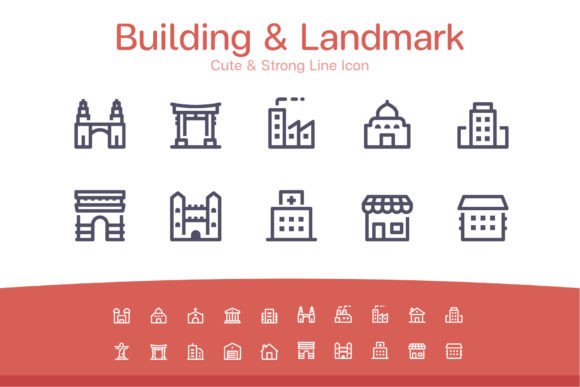
The Building Landmark Line Icon collection is a meticulously crafted package of 20 distinct, stylized icons representing various architectural landmarks and structures. Characterized by a clean, "cute and strong" line art style, these icons strike a perfect balance between friendly appeal and professional robustness. More than just a set of images, it is a comprehensive digital asset toolkit delivered in multiple industry-standard file formats. This includes vector files like Adobe Illustrator (.ai) and EPS 10 for infinite scalability, as well as raster PNGs at common sizes (32x32px to 256x256px) and web-friendly individual SVG files. The inclusion of Photoshop shape layers further ensures seamless integration into diverse design workflows.
Addressing Core Design and Marketing Challenges
The primary challenge in using icons often lies in inconsistency and limited flexibility. Sourcing icons from disparate places results in mismatched styles, which can dilute brand identity and confuse users. Furthermore, icons that aren't provided in multiple formats and resolutions create bottlenecks, forcing designers to manually resize or convert files, which degrades quality and wastes valuable time. For agencies and entrepreneurs operating under tight deadlines, these hurdles can directly impact project delivery and client satisfaction.
The Building Landmark Line Icon set directly addresses these hurdles by providing a single, reliable source. Its uniformity in style ensures that every icon feels part of a family, strengthening the overall visual narrative of your project. The provision of multiple file formats is not merely a feature; it is a practical solution that empowers you to move between different media—from a tiny app button to a large-format printed brochure—without ever compromising on crispness or detail.
Practical Applications and Real-World Outcomes
This icon set transcends being just decorative elements; it becomes a functional tool for clearer communication and enhanced user experience. Consider a web marketing agency creating a new website template for a real estate client. Using these landmark icons as visual cues for different property types or location features can make the interface more intuitive and engaging. The vector files allow for quick color changes to match the client's brand palette, a task made simple with the included .ai and .eps files.
For social media services, these icons can be used to create standout infographics or promotional materials. The "cute and strong" aesthetic is particularly effective on social platforms, attracting attention while conveying strength and reliability. The individual PNG files at 128x128px or 256x256px are ideal for high-resolution posts and cover images. In online marketing apps, the SVG files ensure icons render perfectly at any size on different devices, contributing to a polished, professional user interface that fosters trust.
Tailored Approaches for Different Users
The versatility of the Building Landmark Line Icon set means its utility changes slightly based on the user's primary focus, yet the core benefit of streamlined workflow remains constant.
For a freelance designer juggling multiple clients, the comprehensive format library is a lifesaver. They can open the Illustrator file, quickly extract an icon onto an artboard for a presentation slide, and then use the same icon as a SVG in a website prototype, all without starting a new search or dealing with conversion software. Their outcome is faster turnaround times and more consistent deliverables.
A web development team might prioritize the individual SVG and PNG files. The SVGs integrate directly into code for scalable, performance-friendly web icons, while the predefined PNG sizes serve as perfect fallbacks or assets for mobile application interfaces. Their outcome is a technically sound, visually cohesive final product.
For a marketing manager overseeing content creation, the Photoshop shape layers and easy-to-customize vectors mean their graphic designer can rapidly produce variations for a campaign—from email headers to printed flyers. Their outcome is a unified visual theme across all campaign touchpoints, strengthening brand recognition.
Recommendations for Implementation and Best Use
To maximize the value of this icon set, start by assessing the scope of your project. If it spans multiple media types (digital and print), begin your work in the vector environment using the .ai or .eps files to establish colors and basic compositions. This gives you the most flexibility. When moving to specific applications, export or use the provided format that best suits the medium: SVG for web, PNG for specific pixel-sized needs, and the Photoshop files for layered image editing.
Consider using these icons not just as standalone symbols, but as foundational elements in larger compositions. Their clear line work makes them excellent candidates for creating custom patterns, borders, or even minimalist logos when combined with typography. Because they are simple and highly customizable, you can adjust stroke weights or add subtle gradients within the vector programs to make them uniquely yours while maintaining their distinctive character.
The Building Landmark Line Icon set removes the friction typically associated with icon procurement and application. By investing in a well-rounded, multi-format asset like this, you effectively equip yourself with a visual shorthand that can communicate concepts of location, business, structure, and community across countless projects. It enables you to focus on the bigger creative picture, ensuring your websites, apps, presentations, and promotional materials not only look professional but also communicate with clarity and visual harmony.